

TRAQ Mobile:

The Perfect Solution for Your Sales and Service Teams on the Road.

The perfect companion to your TRAQ account, TRAQ Mobile is the essential app for capturing and optimizing your in-person meetings.


Mobile
Get the TRAQ mobile app from the AppStore
Download the TRAQ mobile app from Google play
Mobile

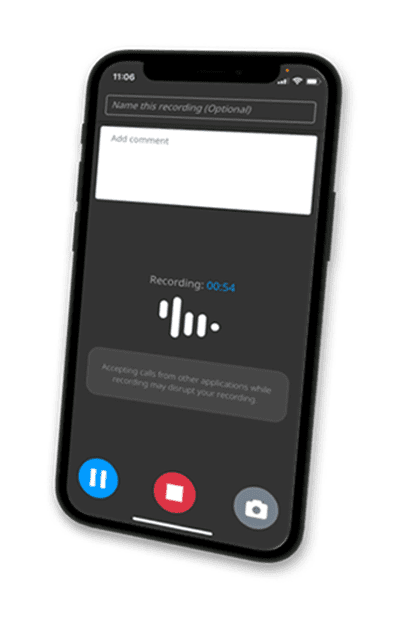
Record

Stay engaged without worrying about missing a single detail of your conversation.

Attach Photos

Add a photo of a tradeshow badge, a whiteboard, or a face to add even more context.

Add Comments

Have an idea you don’t want to forget? Jot down a quick note for yourself or for your team.

Auto-Sync

Your recording, photos, and comments auto-sync to your Traq account for instant analysis.

Take the power of TRAQ with you...everywhere

Gone are the days of struggling to recall critical conversation details – TRAQ transforms every interaction into an opportunity for success.

Mobile

TRAQ Mobile drives your tradeshow ROI

  • Perfect recall of every conversation
  • Call summaries for quick insights
  • Auto-detect & tackle prospect objections
  • Prioritize & track action items
  • Auto-drafts follow-up emails

Work on relationships, not note taking

  • Review and share key meeting points with team members
  • Identify action items and improve meeting efficiency
  • Ensure accurate communication and understanding
  • Quickly reference decisions made during the meeting
  • Save time on post-meeting reviews
Mobile
An event design service team focusing on the conversation rather than taking notes.

Add more productivity to team meetings

  • Document important discussions, ideas, and decisions
  • Identify areas for improvement and innovation
  • Use as training materials for new team members
  • Clearly document action items and responsibilities assigned
  • Attach photos of whiteboard sessions and visual aids for better collaboration

TRAQ Mobile: Unleash Your Potential

Gone are the days of struggling to recall critical conversation details – TRAQ transforms every interaction into an opportunity for success.

Perfect Recall

Never miss a detail again. Every word is captured and analyzed.

Task Prioritization

Keep track of action items, effortlessly.

Insightful Summaries

Instantly grasp the essence of your conversations.

Follow-up Emails

Personalized, context-rich communication at your command.

Identify Objections

Identify and address potential deal-breakers in real-time.

Easy Sharing

Seamlessly distribute key details to stakeholders.

TRAQ for Field Services & Service Teams

Everything you need to know about using TRAQ in the field — from active walkthroughs to multi-stop days to manager coaching.

THE BASICS

6
7

What is TRAQ and how does it help field sales and service reps?

TRAQ is a conversation intelligence platform built for sales and service teams. For reps in the field, whether they're sitting across from a prospect in their home, walking a job site, or doing a needs assessment in a warehouse, TRAQ captures the conversation, transcribes it, and delivers instant AI-powered insights. No more trying to remember what was said. No more incomplete notes.
6
7

Can TRAQ record in-person meetings, or is it just for phone and video calls?

Both. TRAQ has a mobile app designed specifically for in-person meetings. You just open the app, hit record, and go. It works the same way whether you're at a kitchen table with a homeowner or reviewing a service contract in a plant manager's office.
6
7

What does TRAQ actually give you after a meeting?

Right after your meeting wraps up, TRAQ gives you a call summary, a list of follow-up items, flagged objections, and any identified risks from the conversation. Your manager can also see an AI-generated score of how the meeting went based on your company's specific criteria. It's like having a second set of ears in the room that never forgets anything.
6
7

Is this useful for service reps, or just salespeople?

Both. If your team is in the field doing service calls, renewals, needs assessments, or client check-ins, those conversations matter just as much as a sales call. TRAQ helps you capture what was discussed, document commitments, and flag anything that needs follow-up. It's a coaching tool as much as it is a documentation tool.

USING TRAQ IN ACTIVE ENVIRONMENTS

6
7

Does a rep have to stand still or hold the phone up to use TRAQ?

Not at all. That's one of the things that makes TRAQ especially useful for field work. The mobile app picks up voices clearly even when the phone is held at your side, clipped to your belt, or tucked into a shirt pocket. Reps can move naturally through a space walking, pointing things out, taking a look at something without ever breaking stride to manage a recording device. The conversation just gets captured.

6
7

What about situations where the rep is walking and talking at the same time?

That's actually where TRAQ shines. Think about a sales rep walking through a client's home discussing window covering options for each room. They're moving from window to window, the client is pointing things out, preferences are being shared in real time and TRAQ is capturing all of it. No scrambling to take notes. No trying to remember which room wanted blackout shades versus light filtering. It's all there in the transcript when the meeting ends.
The same thing applies on a factory floor. A supervisor is walking a rep through the space, pointing at equipment, describing problems, explaining what they need. That's a high-value conversation happening in a loud, active environment and TRAQ handles it. When the walkthrough is done, the rep has a complete record of everything discussed, flagged action items, and a summary ready to go.

6
7

Does the phone need to be held up near the rep's mouth to get a good recording?

No. TRAQ's mobile app is designed to pick up voices without the phone needing to be anywhere near the speaker's face. Reps have successfully captured clear conversations with the phone held low at their side, resting in a shirt pocket, or sitting on a table nearby. It doesn't need to be the center of attention in the room which actually makes conversations feel more natural for the client too.

6
7

Does TRAQ work in noisy environments like job sites or warehouses?

Yes. The mobile app is built to handle real-world conditions. It's not a perfect science in every environment, but TRAQ handles ambient noise better than most and still delivers a useful transcript even in less-than-ideal settings.

FIELD-SPECIFIC USE CASES

6
7

What happens when a rep has multiple stops in a day?

This is where things can get blurry fast. A rep does five or six stops in a day with different clients, different needs, different conversations and by stop four, details from stop one are already starting to fade. With TRAQ, every conversation is captured and stored separately. At the end of the day, the rep has a clean, accurate record of every meeting. No blending details between clients. No guessing what was said where. Just a complete log of the day, ready to act on.
6
7

Can TRAQ help when one rep hands off a client to another rep or specialist?

Absolutely. This is one of the more underrated use cases. When a field rep does the initial discovery and then passes the client to a closer, a specialist, or a service tech, that handoff is usually where information gets lost. Instead of relying on secondhand notes or a verbal recap, the next person in line can read the transcript or listen to the recording and get the full picture of exactly what the client said, what was promised, and where the conversation left off. It makes handoffs cleaner and protects the client experience.
6
7

What if a client later says "that's not what I asked for" or "you promised me something different?"

It happens in field sales and service more than anyone wants to admit. A client remembers the conversation one way. The rep remembers it another way. Without a record, it's a he-said-she-said situation that damages trust and sometimes costs you the relationship. TRAQ gives you a clear, timestamped record of what was actually discussed. It protects your rep, it protects your company, and honestly, it usually protects the client relationship too because you can go back to the transcript and resolve it fast instead of letting it turn into something bigger.
6
7

How does TRAQ help with quoting accuracy after a site visit or walkthrough?

This is a big one for any business where the quote is built from what the rep observed and discussed on site. A rep walks a job, the client is pointing things out, scope items are flying around and the rep is trying to take mental notes while staying engaged in the conversation. That's a recipe for missed scope and inaccurate quotes. With TRAQ running in the background, the rep can stay fully present during the walkthrough and then go back to the transcript when it's time to build the quote. Everything the client said is right there. Nothing gets missed.
6
7

What if there are multiple people in the room like a client and their spouse, or a supervisor and their plant manager?

TRAQ handles multi-person conversations well. It captures everyone in the room, not just the rep and one other person. That matters because in a lot of field sales situations, the decision isn't made by one person. A spouse weighs in. A plant manager has a different priority than the supervisor. A business owner and their operations manager don't fully agree on what they need. TRAQ picks up all of it -- every voice, every concern, every preference -- so nothing gets lost just because more than two people were talking.
6
7

Is TRAQ useful for follow-up calls after a job is completed or a service is delivered?

Definitely. The sale doesn't end when the contract is signed. Post-install check-ins, service follow-ups, renewal conversations are just as important as the initial meeting, and they're just as easy to drop the ball on. TRAQ captures those calls too, so you have a record of what the client said about their experience, any issues they raised, and any next steps that were discussed. It keeps your team accountable and gives managers visibility into the full client lifecycle, not just the front end.
6
7

Can TRAQ capture conversations that aren't in English?

TRAQ supports multiple languages, so if a rep is having a conversation in Spanish, Portuguese, French, or another supported language, the platform can still transcribe and process it. For organizations with reps serving diverse communities or operating across different regions, this matters. The conversation intelligence doesn't stop working just because the language changes.

SECURITY, COMPLIANCE, AND GETTING STARTED

6
7

How does TRAQ ensure the privacy and security of recorded conversations?

All recordings and transcripts are encrypted and stored securely. TRAQ is built with compliance in mind, so your data is handled according to industry standards. Your team's conversations stay inside your account; no third parties, no surprises.
6
7

Can I access my field recordings on my desktop after the meeting?

Yes. Whatever you capture on the mobile app syncs directly to the TRAQ platform. So when you're back at your desk, you can pull up the full transcript, review the AI scoring, check your follow-up list, and share notes with your team, all from one place.
6
7

How hard is it to get a field team up and running on TRAQ?

It's pretty straightforward. Reps download the mobile app, log in with their TRAQ credentials, and they're ready to record. There's no complicated setup. Most teams are capturing calls within their first day.
6
7

What types of organizations get the most value out of TRAQ for field teams?

Any organization where reps are having face-to-face conversations that drive revenue or client outcomes. That includes home services, insurance, financial services, consulting, legal, and B2B companies with field sales or account management teams. If your reps are in the field and those conversations aren't being captured or coached, you're leaving performance on the table.

AI ANALYSIS AND CUSTOM CONFIGURATION

6
7

What does TRAQ's AI actually do with a recorded conversation?

It's more than just a transcript. Once a conversation is captured, TRAQ's AI analyzes it and pulls out what matters such as summaries, follow-up items, flagged objections, identified risks, and any other key information based on how your account is configured. The AI is doing the work of a sharp assistant who listened to the whole meeting and handed you a clean debrief on the way out the door. You don't have to dig through a recording to find what you need. It's already organized and waiting for you.
6
7

Can TRAQ be configured to capture specific information that's important to our business?

Yes, and this is one of the things that separates TRAQ from a basic recording tool. The AI analysis can be tailored to fit the way your team actually works. If your reps need to capture measurements during a site visit, TRAQ can pull every measurement mentioned in the conversation and present them in an organized format so there’s no hunting through a transcript line by line. If there are specific qualifying questions your reps are supposed to ask, TRAQ can track whether they were asked and what the client said. If there's critical information your process depends on such as budget, timeline, decision criteria, or product preferences, TRAQ can be set up to surface all of it consistently, every time.

6
7

What happens if a rep forgets to capture something important during the meeting?

TRAQ can flag it. If your configuration expects certain information to come out of a conversation such as a measurement, a stated budget, a confirmed next step, or a signed-off scope item and that information isn't present in the recording, the AI can identify the gap and flag it in the output. That means managers aren't just seeing what was captured. They're also seeing what's missing. It's a built-in quality check that keeps reps accountable and helps organizations catch problems before they turn into quoting errors, missed expectations, or lost deals.

COACHING AND MANAGEMENT

6
7

How does TRAQ help managers coach field reps they rarely see in person?

That's one of the biggest wins. Field managers often have no visibility into what's actually being said in the field. With TRAQ, they get scored call data, AI-generated feedback, and the ability to review transcripts and recordings without having to ride along. You can coach reps on real conversations, not just your gut feeling about how they're doing.
6
7

Can TRAQ be used to onboard and train new field reps?

Yes, and this is one of the best ways to use it. When your top field reps are out there having great conversations handling objections well, asking the right questions, and closing effectively are the conversations that become training material. Instead of trying to describe what good looks like in a classroom setting, you can pull real recordings and transcripts and show new reps exactly what it sounds like in the field. That's a much faster way to get someone up to speed than a manual or a role-play exercise.
Mobile
Director, Sales Operations

Fernando

Our team was blown away by TRAQ and it’s ability to capture in-person conversations and put the conversation and analysis right into Salesforce. Amazing!

Get TRAQ Mobile today and never miss a beat

Mobile
Get the TRAQ mobile app from the AppStore
Download the TRAQ mobile app from Google play

Get TRAQ Mobile today and never miss a beat

Get the TRAQ mobile app from the AppStore
Download the TRAQ mobile app from Google play
Robin, TRAQ user, uses the mobile app during in-person meetings
TRAQ user

Robin

After 2 very successful days meeting vendors at the largest DoD convention, being able to record our conversations, collect transcriptions, take photos, and organize it all was amazing!  It was all so easy. TRAQ is a game changer.Thank you.